 |
Rigs of Rods 2026.01
Soft-body Physics Simulation
|

Loading...
Searching...
No Matches
|
Rigs of Rods 2026.01
Soft-body Physics Simulation
|
A PageLoader-derived object you can use with PagedGeometry to produce realistic grass.
Using a GrassLoader is simple - simply create an instance, attach it to your PagedGeometry object with PagedGeometry::setPageLoader(), and add your grass. Important: For best performance, it is recommended that you use GrassPage (included in GrassLoader.h) to display geometry loaded by GrassLoader. This page type is designed for best performance with this grass system. BatchPage will work, although performance will be reduced slightly, and ImpostorPage will run extremely slow.
To add grass, just call addLayer(). addLayer() returns a GrassLayer object pointer, which you should use to further configure your newly added grass. Properties like size, density, color, animation, etc. can be controlled through the GrassLayer class.
Definition at line 49 of file GrassLoader.h.
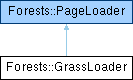
 Inheritance diagram for Forests::GrassLoader:
Public Member Functions | |
| GrassLoader (PagedGeometry *geom) | |
| ~GrassLoader () | |
| GrassLayer * | addLayer (const Ogre::String &material) |
| void | deleteLayer (GrassLayer *layer) |
| std::list< GrassLayer * > & | getLayerList () |
| void | setWindDirection (Ogre::Vector3 &dir) |
| Ogre::Vector3 & | getWindDirection () |
| void | setDensityFactor (float density) |
| float | getDensityFactor () |
| void | setRenderQueueGroup (Ogre::uint8 queueID) |
| void | setHeightFunction (Ogre::Real(*heightFunction)(Ogre::Real x, Ogre::Real z, void *userData), void *userData=NULL) |
| void | loadPage (PageInfo &page) |
| void | unloadPage (PageInfo &page) |
| void | frameUpdate () |
| Public Member Functions inherited from Forests::PageLoader | |
| virtual | ~PageLoader () |
Static Public Member Functions | |
| static float | getRangeRandom (float start, float end) |
Private Member Functions | |
| Ogre::Mesh * | generateGrass_QUAD (PageInfo &page, GrassLayer *layer, const float *grassPositions, unsigned int grassCount) |
| Ogre::Mesh * | generateGrass_CROSSQUADS (PageInfo &page, GrassLayer *layer, const float *grassPositions, unsigned int grassCount) |
| Ogre::Mesh * | generateGrass_SPRITE (PageInfo &page, GrassLayer *layer, const float *grassPositions, unsigned int grassCount) |
Static Private Member Functions | |
| static Ogre::String | getUniqueID () |
Private Attributes | |
| std::list< GrassLayer * > | layerList |
| Ogre::Real(* | heightFunction )(Ogre::Real x, Ogre::Real z, void *userData) |
| void * | heightFunctionUserData |
| PagedGeometry * | geom |
| Ogre::uint8 | renderQueue |
| float | densityFactor |
| RandomTable * | rTable |
| Ogre::Timer | windTimer |
| Ogre::Vector3 | windDir |
| unsigned long | lastTime |
Static Private Attributes | |
| static unsigned long | GUID = 0 |
Friends | |
| class | GrassLayer |
Additional Inherited Members | |
| Protected Member Functions inherited from Forests::PageLoader | |
| void | addEntity (Ogre::Entity *ent, const Ogre::Vector3 &position, const Ogre::Quaternion &rotation, const Ogre::Vector3 &scale=Ogre::Vector3::UNIT_SCALE, const Ogre::ColourValue &color=Ogre::ColourValue::White) |
| Forests::GrassLoader::GrassLoader | ( | PagedGeometry * | geom | ) |
Creates a new GrassLoader object.
| geom | The PagedGeometry object that this GrassLoader will be assigned to. |
Definition at line 49 of file GrassLoader.cpp.
| Forests::GrassLoader::~GrassLoader | ( | ) |
Definition at line 67 of file GrassLoader.cpp.
| GrassLayer * Forests::GrassLoader::addLayer | ( | const Ogre::String & | material | ) |
Adds a grass layer to the scene.
| material | The initial grass texture to use (this can be changed later). |
Since all grass is potentially infinite, it is not added like normal entities which have a specific position. Instead you add a grass "layer" to the scene. A grass layer is a "carpet" of a single type of grass that gets applied everywhere in your world. If you want multiple types of grass with different appearances, you'll have to add a multiple grass layers for each style.
Of course, a grass layer is not completely uniform. The GrassLayer class contains functions to vary grass size and density levels as desired.
Definition at line 82 of file GrassLoader.cpp.
| void Forests::GrassLoader::deleteLayer | ( | GrassLayer * | layer | ) |
Removes and deletes a grass layer from the scene.
This function simply deletes a GrassLayer previously created with addLayer().
Definition at line 91 of file GrassLoader.cpp.
|
virtual |
INTERNAL FUNCTION - DO NOT USE.
Reimplemented from Forests::PageLoader.
Definition at line 97 of file GrassLoader.cpp.
|
private |
Definition at line 363 of file GrassLoader.cpp.
|
private |
Definition at line 198 of file GrassLoader.cpp.
|
private |
Definition at line 579 of file GrassLoader.cpp.
|
inline |
Returns the global density factor for this GrassLoader.
Definition at line 118 of file GrassLoader.h.
|
inline |
Returns a list of added grass layers.
This function returns a std::list<GrassLayer*> reference, which contains all grass layers which have been added to this GrassLoader.
Definition at line 81 of file GrassLoader.h.
|
static |
|
inlinestaticprivate |
Definition at line 212 of file GrassLoader.h.
|
inline |
Returns the global wind direction for this GrassLoader.
Definition at line 99 of file GrassLoader.h.
|
virtual |
INTERNAL FUNCTION - DO NOT USE.
Implements Forests::PageLoader.
Definition at line 129 of file GrassLoader.cpp.
|
inline |
Sets the global density factor for this GrassLoader.
This function can be used to up-scale or down-scale the density of all grass associated with this GrassLoader. This is typically used to provide the user the option to reduce grass density for better performance on slower machines.
Final density values are calculated by multiplying the layer density by this density factor. For example, a layer with .4 density and a density factor of .5 will result in a final density of .2 (.5 * .4)
By default, the density factor is set to 1.0 so the layer density is not modified.
Definition at line 113 of file GrassLoader.h.
|
inline |
Sets the height function used to calculate grass Y coordinates.
| heightFunction | A pointer to a height function |
Unless you want all your grass placed at 0 height, you need to specify a height function so GrassLoader will be able to calculate the Y coordinate. The height function given to setHeightFunction() should use the following prototype (although you can name the function anything you want):
The userData parameter allows you to include any additional data you want when your height function is called, and is completely optional (although you can't actually omit it from the declaration, you can ignore it). Any userData value you choose to supply to setHeightFunction() will be passed on to your height function every time it is called.
After you've defined a height function, using setHeightFunction is easy:
In most cases, you may not even need to use the extra "userData" parameter, but it's there in the event that your height function needs extra contextual data.
Definition at line 168 of file GrassLoader.h.
|
inline |
Sets the render queue group the grass will be rendered through.
| queueID | Enumerated value of the queue group to use |
Like Ogre's MovableObject::setRenderQueueGroup(), this allows you to customize the rendering order of your scene. Since grass is transparent, it's likely that you may encounter alpha-sorting issues between grass and your particle effects, for example. In this case you can use this function to adjust the rendering order of the grass to fix the problem.
If you don't call this function, the RENDER_QUEUE_6 queue will be used.
Definition at line 135 of file GrassLoader.h.
|
inline |
Sets the global wind direction for this GrassLoader.
GrassLayer animation properties are used to configure the most of the animation behavior (sway length, speed, etc.), but wind direction is not included in GrassLayer since this is really a global property. Using this function, you can set the "global" wind direction which affects all animated grass associated with this PageLoader.
Default value is Vector3::UNIT_X.
Definition at line 94 of file GrassLoader.h.
|
virtual |
INTERNAL FUNCTION - DO NOT USE.
Reimplemented from Forests::PageLoader.
Definition at line 193 of file GrassLoader.cpp.
|
friend |
Definition at line 184 of file GrassLoader.h.
|
private |
Definition at line 201 of file GrassLoader.h.
|
private |
Definition at line 199 of file GrassLoader.h.
|
staticprivate |
Definition at line 211 of file GrassLoader.h.
|
private |
Definition at line 195 of file GrassLoader.h.
|
private |
Definition at line 196 of file GrassLoader.h.
|
private |
Definition at line 209 of file GrassLoader.h.
|
private |
Definition at line 192 of file GrassLoader.h.
|
private |
Definition at line 200 of file GrassLoader.h.
|
private |
Definition at line 204 of file GrassLoader.h.
|
private |
Definition at line 208 of file GrassLoader.h.
|
private |
Definition at line 207 of file GrassLoader.h.
 1.9.8
1.9.8