 |
Rigs of Rods 2026.01
Soft-body Physics Simulation
|

Loading...
Searching...
No Matches
|
Rigs of Rods 2026.01
Soft-body Physics Simulation
|
A PageLoader-derived object you can use with PagedGeometry to easily place trees on your terrain.
Using a TreeLoader is simple - simply create an instance, attach it to your PagedGeometry object with PagedGeometry::setPageLoader(), and add your trees.
To add trees, just call TreeLoader2D::addTree(), supplying the appropriate parameters. You may notice that TreeLoader2D restricts trees to uniform scale, yaw rotation, and a position value with no vertical component. This is done to conserve memory; TreeLoader2D packs trees into memory as effeciently as possible, taking only 6 bytes per tree. This means 1 million trees only takes 5.72 MB of RAM (additionally, adding 1 million trees takes less than a second in a release build).
If the inability to supply a vertical coordinate to addTree() is too limiting, or you are unable to implement a fast enough height function, please refer to TreeLoader3D. TreeLoader3D allows you to provide full 3D x/y/z coordinates, although 40% more memory is required per tree.
Definition at line 51 of file TreeLoader2D.h.
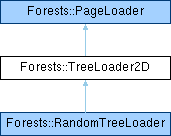
 Inheritance diagram for Forests::TreeLoader2D:
Data Structures | |
| struct | TreeDef |
Public Member Functions | |
| TreeLoader2D (PagedGeometry *geom, const TBounds &bounds) | |
| ~TreeLoader2D () | |
| void | addTree (Ogre::Entity *entity, const Ogre::Vector3 &position, Ogre::Degree yaw=Ogre::Degree(0), Ogre::Real scale=1.0f, void *userData=NULL) |
| void | deleteTrees (const Ogre::Vector3 &position, Ogre::Real radius=0.001f, Ogre::Entity *type=NULL) |
| void | deleteTrees (TBounds area, Ogre::Entity *type=NULL) |
| void | setHeightFunction (Ogre::Real(*heightFunction)(Ogre::Real x, Ogre::Real z, void *userData), void *userData=NULL) |
| void | setColorMap (const Ogre::String &mapFile, MapChannel channel=CHANNEL_COLOR) |
| void | setColorMap (Ogre::TexturePtr map, MapChannel channel=CHANNEL_COLOR) |
| ColorMap * | getColorMap () |
| void | setColorMapFilter (MapFilter filter) |
| void | setMaximumScale (Ogre::Real maxScale) |
| Ogre::Real | getMaximumScale () const |
| void | setMinimumScale (Ogre::Real minScale) |
| Ogre::Real | getMinimumScale () const |
| const TBounds & | getBounds () const |
| void | loadPage (PageInfo &page) |
| Public Member Functions inherited from Forests::PageLoader | |
| virtual void | unloadPage (PageInfo &page) |
| virtual void | frameUpdate () |
| virtual | ~PageLoader () |
Private Types | |
| typedef std::map< Ogre::Entity *, std::vector< TreeDef > * >::iterator | PageGridListIterator |
| typedef std::pair< Ogre::Entity *, std::vector< TreeDef > * > | PageGridListValue |
Private Member Functions | |
| std::vector< TreeDef > & | _getGridPage (std::vector< TreeDef > *grid, int x, int z) |
| void | _setGridPage (std::vector< TreeDef > *grid, int x, int z, const std::vector< TreeDef > &page) |
Private Attributes | |
| int | pageGridX |
| int | pageGridZ |
| Ogre::Real | pageSize |
| TBounds | gridBounds |
| TBounds | actualBounds |
| Ogre::Real | maximumScale |
| Ogre::Real | minimumScale |
| ColorMap * | colorMap |
| MapFilter | colorMapFilter |
| Ogre::Real(* | heightFunction )(Ogre::Real x, Ogre::Real z, void *userData) |
| void * | heightFunctionUserData |
| PagedGeometry * | geom |
| std::map< Ogre::Entity *, std::vector< TreeDef > * > | pageGridList |
Additional Inherited Members | |
| Protected Member Functions inherited from Forests::PageLoader | |
| void | addEntity (Ogre::Entity *ent, const Ogre::Vector3 &position, const Ogre::Quaternion &rotation, const Ogre::Vector3 &scale=Ogre::Vector3::UNIT_SCALE, const Ogre::ColourValue &color=Ogre::ColourValue::White) |
|
private |
Definition at line 261 of file TreeLoader2D.h.
|
private |
Definition at line 262 of file TreeLoader2D.h.
| Forests::TreeLoader2D::TreeLoader2D | ( | PagedGeometry * | geom, |
| const TBounds & | bounds | ||
| ) |
Creates a new TreeLoader2D object.
| geom | The PagedGeometry object that this TreeLoader2D will be assigned to. |
| bounds | The rectangular boundary in which all trees will be placed. |
Definition at line 26 of file TreeLoader2D.cpp.
| Forests::TreeLoader2D::~TreeLoader2D | ( | ) |
Definition at line 57 of file TreeLoader2D.cpp.
|
inlineprivate |
Definition at line 264 of file TreeLoader2D.h.
|
inlineprivate |
Definition at line 276 of file TreeLoader2D.h.
| void Forests::TreeLoader2D::addTree | ( | Ogre::Entity * | entity, |
| const Ogre::Vector3 & | position, | ||
| Ogre::Degree | yaw = Ogre::Degree(0), |
||
| Ogre::Real | scale = 1.0f, |
||
| void * | userData = NULL |
||
| ) |
Adds an entity to the scene with the specified location, rotation, and scale.
| entity | The entity to be added to the scene. |
| position | The desired position of the tree |
| yaw | The desired rotation around the vertical axis in degrees |
| scale | The desired scale of the entity |
Trees added with TreeLoader2D are restricted to yaw rotation only, and uniform scale values. This conserves memory by avoiding storage of useless data (for example, storing the height of each tree when this can be easily calculated from the terrain's shape).
Unlike TreeLoader3D, the vertical position of each tree is NOT stored (therefore TreeLoader2D takes less memory than TreeLoader3D), but this means you must provide a height function with setHeightFunction() in order for TreeLoader2D to be able to calculate the desired height values when the time comes. If you do not specify a height function, all trees will appear at 0 height.
Definition at line 67 of file TreeLoader2D.cpp.
| void Forests::TreeLoader2D::deleteTrees | ( | const Ogre::Vector3 & | position, |
| Ogre::Real | radius = 0.001f, |
||
| Ogre::Entity * | type = NULL |
||
| ) |
Deletes trees within a certain radius of the given coordinates.
| position | The coordinate of the tree(s) to delete |
| radius | The radius from the given coordinate where trees will be deleted |
| type | The type of tree to delete (optional) |
| void Forests::TreeLoader2D::deleteTrees | ( | TBounds | area, |
| Ogre::Entity * | type = NULL |
||
| ) |
Deletes trees within a certain rectangular area.
| area | The area where trees are to be deleted |
| type | The type of tree to delete (optional) |
Definition at line 213 of file TreeLoader2D.cpp.
|
inline |
Gets the tree boundary area.
This function returns the boundaries in which all trees are added. This value is set from the constructor.
Definition at line 227 of file TreeLoader2D.h.
|
inline |
Gets a pointer to the color map being used.
You can use this function to access the internal color map object used by the TreeLoader2D. Through this object you can directly manipulate the pixels of the color map, among other things.
Note that although you can edit the color map in real-time through this class, the changes won't be uploaded to your video card until you call PagedGeometry::reloadGeometry(). If you don't, the colors of the trees you see will remain unchanged.
Definition at line 169 of file TreeLoader2D.h.
|
inline |
Gets the maximum tree scale value.
This function will return the maximum tree scale value as set by setMaximumScale(). By default this value will be 2.0.
Definition at line 203 of file TreeLoader2D.h.
|
inline |
Gets the minimum tree scale value.
This function will return the minimum tree scale value as set by setMinimumScale(). By default this value will be 0.
Definition at line 221 of file TreeLoader2D.h.
|
virtual |
This should be overridden to load a specified region of entities.
| page | A PageInfo variable which includes boundary information and other useful values. |
Override this function to load entities within the specified boundary. The boundary information is contained in the "page" parameter, along with other useful information as well (see the PageInfo documentation for more info about this).
Simply use the member function addEntity() to add all the entities you want. If you create your own objects inside this function, you are responsible for deleting it appropriately in unloadPage() or somewhere else. The PageInfo::userData member is useful here since you can point it to your data structures for later reference in unloadPage().
Implements Forests::PageLoader.
Definition at line 309 of file TreeLoader2D.cpp.
| void Forests::TreeLoader2D::setColorMap | ( | const Ogre::String & | mapFile, |
| MapChannel | channel = CHANNEL_COLOR |
||
| ) |
Sets the color map used to color trees.
| mapFile | The color map image |
| channel | The color channel(s) to from the image to use |
A color map is simply a texture that allows you to vary the color and shading of trees across your world for a more realistic look. For example, adding a dark spot to the center of your color map will make trees near the center of your world look darker.
The channel parameter allows you to extract the color information from the image's red, green, blue, alpha, or color values. For example, you may store the desired shade of your trees in the red channel of an image, in which case you would use CHANNEL_RED (when you choose a single channel, it is converted to a greyscale color). By default, CHANNEL_COLOR is used, which uses the full color information available in the image.
Definition at line 285 of file TreeLoader2D.cpp.
| void Forests::TreeLoader2D::setColorMap | ( | Ogre::TexturePtr | map, |
| MapChannel | channel = CHANNEL_COLOR |
||
| ) |
Sets the color map used to color trees.
Overloaded to accept a Texture object. See the original setColorMap() documentation above for more detailed information on color maps.
Definition at line 297 of file TreeLoader2D.cpp.
|
inline |
Sets the filtering mode used for the color map.
This function can be used to set the filtering mode used for your tree color map. By default, no filtering is used (MAPFILTER_NONE). If you enable bilinear filtering by using MAPFILTER_BILINEAR, the resulting tree coloration may appear more smooth (less pixelated), depending on the resolution of your color map.
MAPFILTER_BILINEAR is slightly slowe than MAPFILTER_NONE, so don't use it unless you notice considerable pixelation.
Definition at line 180 of file TreeLoader2D.h.
|
inline |
Sets the height function used to calculate tree height coordinates.
| heightFunction | A pointer to a height function |
| userData | Optional user data to be supplied to the height function |
Unless you want all your trees placed at 0 height, you need to specify a height function so TreeLoader2D will be able to calculate the height coordinate. The height function given to setHeightFunction() should use the following prototype (although you can name the function anything you want):
The userData parameter allows you to include any additional data you want when your height function is called, and is completely optional (although you can't actually omit it from the declaration, you can ignore it). Any userData value you choose to supply to setHeightFunction() will be passed on to your height function every time it is called.
After you've defined a height function, using setHeightFunction is easy:
In most cases, you may not even need to use the extra "userData" parameter, but it's there in the event that your height function needs extra contextual data.
Definition at line 130 of file TreeLoader2D.h.
|
inline |
Sets the maximum tree scale value.
When calling addTree() to add trees, the scale values you are allowed to use are restricted to 2.0 maximum by default. With this function, you can adjust the maximum scale you are allowed to use for trees. However, keep in mind that the higher the maximum scale is, the less precision there will be in storing the tree scales (since scale values are actually packed into a single byte).
Definition at line 196 of file TreeLoader2D.h.
|
inline |
Sets the minimum tree scale value.
When calling addTree() to add trees, the scale values you are allowed to use are restricted in the range of 0.0 - 2.0 by default. With this function, you can adjust the minimum scale you are allowed to use for trees. The closer this minimum value is to the maximum tree scale, the more precision there will be when storing trees with addTree().
Definition at line 214 of file TreeLoader2D.h.
|
private |
Definition at line 242 of file TreeLoader2D.h.
|
private |
Definition at line 247 of file TreeLoader2D.h.
|
private |
Definition at line 248 of file TreeLoader2D.h.
|
private |
Definition at line 255 of file TreeLoader2D.h.
|
private |
Definition at line 242 of file TreeLoader2D.h.
|
private |
Definition at line 251 of file TreeLoader2D.h.
|
private |
Definition at line 252 of file TreeLoader2D.h.
|
private |
Definition at line 244 of file TreeLoader2D.h.
|
private |
Definition at line 244 of file TreeLoader2D.h.
|
private |
Definition at line 260 of file TreeLoader2D.h.
|
private |
Definition at line 240 of file TreeLoader2D.h.
|
private |
Definition at line 240 of file TreeLoader2D.h.
|
private |
Definition at line 241 of file TreeLoader2D.h.
 1.9.8
1.9.8