 |
Rigs of Rods 2026.01
Soft-body Physics Simulation
|

Loading...
Searching...
No Matches
|
Rigs of Rods 2026.01
Soft-body Physics Simulation
|
A class which you extend to provide a callback function for loading entities.
Unlike most entity managers, PagedGeometry does not allow you to simply add all your entities to the object, and let the engine run from that point on. Since the PagedGeometry engine is designed to work with extremely large game areas, preloading everything would take far too much memory. Instead, it pages the geometry. In other words, it loads the geometry only as needed.
Whenever the engine needs a specific region of geometry to be loaded, it calls on your page loader class's loadPage() function. It's completely up to you how this function loads the entities, just as long as it gets the job done. When loadPage() is called, you are provided with a PageInfo variable, which specifies the boundary which must be loaded (in addition to other useful info). Make sure you don't add anything outside of this boundary, otherwise the results may be unpredictable.
Within loadPage(), you add entities by calling addEntity(). Simply supply the entity you want to add (you can add the same entity as many times as you want - in fact, you should do this as much as possible for better performance), and it's position, rotation, and scale (optional).
Note that your page loader may be asked to load an area which is out of your world's bounds (if you have any). In this case simply return without adding any entities.
To set up a page loader, just make a new sub-class (call it anything you want) of PageLoader. Your class must have one function:
Make sure you get the declaration right, otherwise it won't compile. The rest is up to you. You can define your own member functions if that helps, just as long as your loadPage() function does it's job right.
Once you've created your PageLoader-derived class, you need to attach it to a PagedGeometry object. To do this, simply create an instance of your class, and call
Remember: If you ever delete a PagedGeometry object, you will have to delete your page loader yourself (if you want to). The PagedGeometry destructor won't do this for you.
Definition at line 998 of file PagedGeometry.h.
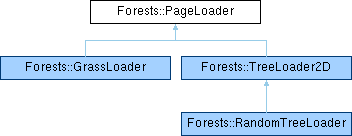
 Inheritance diagram for Forests::PageLoader:
Public Member Functions | |
| virtual void | loadPage (PageInfo &page)=0 |
| virtual void | unloadPage (PageInfo &page) |
| virtual void | frameUpdate () |
| virtual | ~PageLoader () |
Protected Member Functions | |
| void | addEntity (Ogre::Entity *ent, const Ogre::Vector3 &position, const Ogre::Quaternion &rotation, const Ogre::Vector3 &scale=Ogre::Vector3::UNIT_SCALE, const Ogre::ColourValue &color=Ogre::ColourValue::White) |
Private Attributes | |
| GeometryPage * | geomPage |
Friends | |
| class | GeometryPageManager |
|
inlinevirtual |
Destructor This is defined here so the destructors of derived classes are called properly.
Whether or not you actually implement a destructor is up to you.
Definition at line 1059 of file PagedGeometry.h.
|
inlineprotected |
Call this from loadPage() to add an entity to the page being loaded.
| ent | The entity to add. You may add the same entity multiple times. |
| position | The position where the entity will be placed. |
| rotation | The rotation to apply to the entity. |
| scale | The scale to apply to the entity. |
| color | The color to apply to the whole entity |
Definition at line 1081 of file PagedGeometry.h.
|
inlinevirtual |
Provides a method for you to perform per-frame tasks for your PageLoader if overridden (optional)
frameUpdate() is completely optional, and unnecessary in most cases. However, if you ever need to update anything in your PageLoader per-frame, this function is here for that purpose.
Reimplemented in Forests::GrassLoader.
Definition at line 1052 of file PagedGeometry.h.
|
pure virtual |
This should be overridden to load a specified region of entities.
| page | A PageInfo variable which includes boundary information and other useful values. |
Override this function to load entities within the specified boundary. The boundary information is contained in the "page" parameter, along with other useful information as well (see the PageInfo documentation for more info about this).
Simply use the member function addEntity() to add all the entities you want. If you create your own objects inside this function, you are responsible for deleting it appropriately in unloadPage() or somewhere else. The PageInfo::userData member is useful here since you can point it to your data structures for later reference in unloadPage().
Implemented in Forests::RandomTreeLoader, Forests::GrassLoader, and Forests::TreeLoader2D.
|
inlinevirtual |
This may be overridden (optional) to unload custom data associated with a page.
| page | A PageInfo variable which includes boundary information and other useful values. |
During a PageLoader::loadPage() call, you are supposed to add entities by calling the addEntity() member function. In case you created anything else (particle systems, sound effects, etc.), this function gives you a chance to delete them along with the rest of the entities added with addEntity().
In most cases you won't need to implement this function in your page loader at all, since addEntity() is usually all that is used.
Reimplemented in Forests::RandomTreeLoader, and Forests::GrassLoader.
Definition at line 1037 of file PagedGeometry.h.
|
friend |
Definition at line 1088 of file PagedGeometry.h.
|
private |
Definition at line 1091 of file PagedGeometry.h.
 1.9.8
1.9.8